What is Motherboard?
A
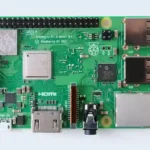
motherboard, also known as a system board or mainboard, is the central printed
circuit board (PCB) in a computer system. It is the backbone of a computer and
connects all the various components together, including the processor, memory,
storage, and peripherals. The motherboard also contains slots and sockets for
expansion cards, such as graphics cards, sound cards, and network interface
cards.
The
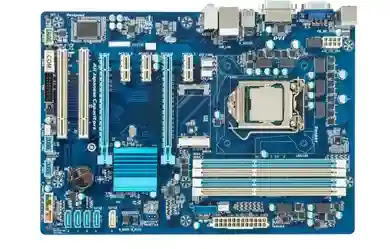
motherboard acts as a communication hub between all the components, allowing
data to be exchanged between them. It also provides power to the components and
manages their operation, including controlling the timing and flow of data.
The size,
shape, and layout of a motherboard can vary depending on the type of computer
and its intended use, but they typically include a CPU socket, memory slots,
expansion slots, power connectors, and input/output (I/O) ports for peripherals
such as USB devices, network cables, and audio devices.
How many
types and what?
There are
several types of motherboards available, each designed to suit different needs
and specifications. Here are some of the most common types:
- nceATX (Advad Technology
eXtended): This is the most popular motherboard form factor and is used in
most desktop computers. It has a standard size of 12 x 9.6 inches and
typically includes multiple expansion slots, such as PCIe, as well as
several SATA ports. - Micro-ATX (mATX): This
motherboard is a smaller version of the standard ATX motherboard,
measuring 9.6 x 9.6 inches. It is often used in compact desktops or HTPCs
(Home Theater PC), and it typically includes fewer expansion slots and
SATA ports than the standard ATX motherboard. - Mini-ITX: This is the smallest
motherboard form factor, measuring just 6.7 x 6.7 inches. It is often used
in small form factor desktops or embedded systems and typically includes
only one PCIe slot and two SATA ports. - E-ATX (Extended ATX): This is
a larger version of the standard ATX motherboard, measuring 12 x 13
inches. It is often used in high-end gaming or workstation systems and
typically includes more expansion slots and SATA ports than the standard
ATX motherboard. - Server Motherboard: These are
designed for server use, and they usually have support for multiple CPUs,
memory, and storage options. - Workstation Motherboard: These
are designed for use in high-end workstations and often have support for
multiple CPUs, high-speed storage options, and multiple PCIe slots.
Overall,
the type of motherboard you choose will depend on your specific needs and
budget, as well as the components you plan to use with it.
Motherboard
details
A
motherboard, also known as a mainboard, is the primary circuit board in a
computer that connects all the various components together. It is responsible
for providing communication between the CPU, RAM, storage devices, and other
peripherals. Some of the key details about a motherboard include:
- Form factor: The physical size
and shape of the motherboard, which determines what type of case it can
fit into. - Socket type: The type of CPU
socket that is compatible with the motherboard, which determines what type
of processor can be used. - Chipset: The chipset is a
collection of chips on the motherboard that manage communication between
the CPU, memory, and other components. - RAM slots: The number and type
of RAM slots on the motherboard, which determines how much memory can be
installed and what type of RAM is compatible. - Expansion slots: The number
and type of expansion slots on the motherboard, which determines what
additional cards can be installed, such as graphics cards, sound cards,
and network cards. - Storage connectors: The type
and number of storage connectors on the motherboard, which determines what
type of storage devices can be connected, such as hard drives and
solid-state drives. - USB and other ports: The
number and type of USB and other ports on the motherboard, which
determines what types of peripherals can be connected. - BIOS: The Basic Input/Output
System is firmware that initializes the hardware during boot and provides
the software interface between the operating system and the hardware. - Power connectors: The type and
number of power connectors on the motherboard, which determines what type
of power supply is required. - I/O Ports: The I/O ports on the
motherboard provide connectivity for peripherals, such as USB devices,
network cables, and audio devices
There are
many different types of motherboards available, each with their own unique
features and specifications, designed for different types of systems and
applications.
Function
of Motherboard
The
motherboard is the main printed circuit board (PCB) of a computer and serves as
the central hub for all hardware components to communicate with each other. Its
primary function is to connect and manage the various hardware components of a
computer system, including the CPU, RAM, graphics card, storage devices, and
peripherals.
Some of
the main functions of a motherboard include:
- Providing a communication
pathway between different components: The motherboard allows different
hardware components to communicate with each other through the use of
various buses and connectors. - Hosting the CPU and memory:
The motherboard provides a socket for the CPU and slots for the memory
modules, which are critical components in the computer’s performance. - Managing system resources: The
motherboard manages system resources such as power, cooling, and data flow
to ensure that the system operates efficiently and reliably. - Providing expansion slots: The
motherboard has expansion slots for additional hardware components, such as
additional graphics cards, network cards, and storage devices. - Providing input/output (I/O)
interfaces: The motherboard has various I/O interfaces such as USB,
Ethernet, and audio connectors, which allow the computer to interact with
external devices and networks.
Overall,
the motherboard plays a critical role in the functioning of a computer system,
and its design and capabilities can significantly affect the performance and
capabilities of the system.
Motherboard Sizes
There are
several different motherboard sizes or form factors available, each with their
own specifications and uses. Some of the most common motherboard sizes include:
- ATX (Advanced Technology
eXtended): This is the most common motherboard size, with dimensions of
305 mm x 244 mm. It has the most expansion slots and is designed for
high-end gaming and workstation systems. - Micro-ATX: This is a smaller
version of the ATX motherboard, with dimensions of 244 mm x 244 mm. It has
fewer expansion slots, but is still suitable for gaming and workstation
systems. - Mini-ITX: This is a compact
motherboard size, with dimensions of 170 mm x 170 mm. It is often used in
small form factor (SFF) or home theater PCs (HTPCs). - Extended ATX (EATX): This is a
larger version of the ATX motherboard, with dimensions of 305 mm x 330 mm.
It is designed for high-end gaming and workstation systems that require
even more expansion slots and features. - Thin Mini-ITX: This is a
thinner version of the Mini-ITX motherboard, with a maximum height of 20
mm. It is often used in all-in-one (AIO) or ultra-thin desktop PCs. - Nano-ITX: This is an even
smaller motherboard size, with dimensions of 120 mm x 120 mm. It is
designed for embedded systems and other small devices. - Pico-ITX: This is the smallest
motherboard size, with dimensions of 100 mm x 72 mm. It is also designed
for embedded systems and other small devices.