What is Raspberry Pi?
Raspberry Pi is a series of small single-board computers
developed in the UK by the Raspberry Pi Foundation. These small, affordable
computers are designed to be a low-cost platform for learning, experimentation,
and DIY projects.
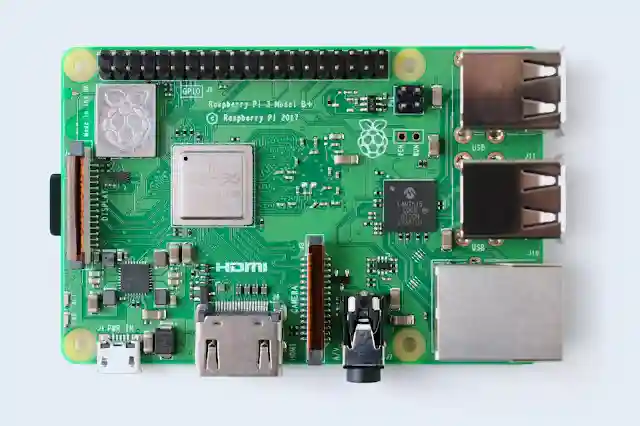
The Raspberry Pi consists of a printed circuit board (PCB)
with a processor, memory, and various input/output interfaces, such as GPIO
(General Purpose Input/Output) pins, USB ports, Ethernet, and HDMI output. They
also feature a range of accessories and peripherals that can be added, such as
cameras, displays, and sensors.

Raspberry Pi boards are powered by a range of ARM
processors, with the latest models featuring quad-core processors and up to 8GB
of RAM. They run a range of operating systems, including Raspberry Pi OS
(formerly Raspbian), Ubuntu, and others.
The Raspberry Pi has become popular for a wide range of
applications, including education, home automation, media centers, game
consoles, robotics, and more. Its low cost and versatility make it accessible
to a wide range of users, from hobbyists to professionals.
Overall, the Raspberry Pi has revolutionized the world of
computing by providing an affordable and powerful platform for experimentation,
learning, and innovation.
Raspberry Pi working process
The Raspberry Pi is a small computer that can be used for a
wide range of tasks. Here are the general steps for using a Raspberry Pi:
- Set up
the hardware: You will need to connect the Raspberry Pi to a power source,
a display (such as a monitor or TV), a keyboard, and a mouse. You may also
need to connect it to the internet, either via Ethernet or Wi-Fi.
- Install
an operating system: The Raspberry Pi requires an operating system to
function. The most common operating system for Raspberry Pi is Raspberry
Pi OS, which can be downloaded from the Raspberry Pi Foundation’s website.
Once you have downloaded the image file, you will need to write it to an
SD card using a program like Etcher.
- Boot
the Raspberry Pi: Insert the SD card into the Raspberry Pi and power it
on. The Raspberry Pi should boot into the operating system, where you can
begin using it.
- Install
software: Once the Raspberry Pi is up and running, you can install
software and applications. Raspberry Pi OS comes with a range of
pre-installed software, including the Chromium web browser, the
LibreOffice office suite, and the Python programming language.
- Connect
to peripherals: The Raspberry Pi has a range of input/output interfaces,
such as GPIO pins, USB ports, and Ethernet. You can connect various
peripherals to these interfaces, such as cameras, sensors, and external
storage devices.
- Use
the Raspberry Pi: The Raspberry Pi can be used for a wide range of tasks,
depending on your needs and interests. Some examples include building a
media center, setting up a home automation system, creating a retro gaming
console, or developing a robotics project.
Overall, the Raspberry Pi is a versatile and powerful
computer that can be used for a wide range of tasks, from basic computing to
advanced projects.
developed in the UK by the Raspberry Pi Foundation. These small, affordable
computers are designed to be a low-cost platform for learning, experimentation,
and DIY projects.
with a processor, memory, and various input/output interfaces, such as GPIO
(General Purpose Input/Output) pins, USB ports, Ethernet, and HDMI output. They
also feature a range of accessories and peripherals that can be added, such as
cameras, displays, and sensors.

processors, with the latest models featuring quad-core processors and up to 8GB
of RAM. They run a range of operating systems, including Raspberry Pi OS
(formerly Raspbian), Ubuntu, and others.
applications, including education, home automation, media centers, game
consoles, robotics, and more. Its low cost and versatility make it accessible
to a wide range of users, from hobbyists to professionals.
computing by providing an affordable and powerful platform for experimentation,
learning, and innovation.
wide range of tasks. Here are the general steps for using a Raspberry Pi:
the hardware: You will need to connect the Raspberry Pi to a power source,
a display (such as a monitor or TV), a keyboard, and a mouse. You may also
need to connect it to the internet, either via Ethernet or Wi-Fi.
an operating system: The Raspberry Pi requires an operating system to
function. The most common operating system for Raspberry Pi is Raspberry
Pi OS, which can be downloaded from the Raspberry Pi Foundation’s website.
Once you have downloaded the image file, you will need to write it to an
SD card using a program like Etcher.
the Raspberry Pi: Insert the SD card into the Raspberry Pi and power it
on. The Raspberry Pi should boot into the operating system, where you can
begin using it.
software: Once the Raspberry Pi is up and running, you can install
software and applications. Raspberry Pi OS comes with a range of
pre-installed software, including the Chromium web browser, the
LibreOffice office suite, and the Python programming language.
to peripherals: The Raspberry Pi has a range of input/output interfaces,
such as GPIO pins, USB ports, and Ethernet. You can connect various
peripherals to these interfaces, such as cameras, sensors, and external
storage devices.
the Raspberry Pi: The Raspberry Pi can be used for a wide range of tasks,
depending on your needs and interests. Some examples include building a
media center, setting up a home automation system, creating a retro gaming
console, or developing a robotics project.
computer that can be used for a wide range of tasks, from basic computing to
advanced projects.
Proper
guidelines for using Raspberry Pi
Here are
some guidelines for using Raspberry Pi:
- Choose the right model:
Raspberry Pi comes in various models with different specifications. Make
sure you choose the right model based on your needs and the tasks you want
to perform. - Power supply: Raspberry Pi
requires a 5V micro USB power supply with a minimum current rating of
2.5A. Always use a power supply with a good quality cable to avoid voltage
drops and instability issues. - Operating System: You can run
various operating systems on Raspberry Pi such as Raspbian, Ubuntu, or
other Linux distributions. Choose the operating system based on your
requirements. - Storage: Raspberry Pi doesn’t
come with built-in storage, so you need to use a micro SD card to store
the operating system and data. Use a high-speed SD card for better
performance. - GPIO pins: Raspberry Pi comes
with GPIO (General Purpose Input Output) pins that allow you to connect
and control various electronic components. Make sure you use the right
pins and follow the pinout diagram to avoid damaging the board. - Cooling: Raspberry Pi can get
hot during use, especially if you run resource-intensive applications.
Consider using a heatsink or fan to prevent overheating and ensure stable
performance. - Networking: Raspberry Pi comes
with built-in Ethernet and Wi-Fi connectivity. Make sure you set up the
network settings correctly to access the internet and connect to other
devices. - Updates: Keep your Raspberry
Pi up to date by regularly updating the operating system and software.
This ensures security and stability and keeps your Pi running smoothly. - Community: Raspberry Pi has a
vast community of users who share their projects, tips, and tricks. Join
the community to learn more and get help when needed.
By
following these guidelines, you can ensure that you use Raspberry Pi safely and
effectively.
5 Useful
Programming Languages for Raspberry Pi
Raspberry
Pi can run various programming languages, and here are five useful ones:
- Python: Python is one of the
most popular programming languages for Raspberry Pi. It is easy to learn
and has a large community of users. Python is used for various tasks,
including web development, data analysis, and robotics. - C/C++: C and C++ are powerful
programming languages that are ideal for writing applications that require
direct hardware access or low-level system programming. They are efficient
and fast, making them suitable for resource-intensive tasks. - Java: Java is a popular
programming language that is used for developing enterprise applications,
mobile apps, and games. Java is also used for developing applications for
Raspberry Pi. - JavaScript: JavaScript is a
versatile programming language that is used for web development, desktop
applications, and server-side programming. It is also used for developing
applications for Raspberry Pi. - Scratch: Scratch is a
programming language that is ideal for beginners and children. It uses a
graphical interface to teach programming concepts and is used for
developing interactive games and animations.
By using
these programming languages, you can develop various applications for Raspberry
Pi, including web applications, IoT projects, robotics, and more.
Raspberry
Pi 4 pin diagram and terminal contacts
The
Raspberry Pi 4 Model B has a 40-pin GPIO header that provides access to the
board’s various interfaces and signals. Here is the pin diagram for Raspberry
Pi 4:

2 4
6 8 10 12 14 16 18 20 22 24 26 28 30 32 34 36 38
40
1 3
5 7 9 11
13 15 17 19 21 23 25 27 29 31 33 35 37 39
+3V3 | 1
2 | +5V
GPIO2 |
3 4 | +5V
GPIO3 |
5 6 | GND
GPIO4 |
7 8 | GPIO14
GND | 9
10 | GPIO15
GPIO17|
11 12 | GPIO18
GPIO27|
13 14 | GND
GPIO22|
15 16 | GPIO23
+3V3 | 17
18 | GPIO24
GPIO10|
19 20 | GND
GPIO9 |
21 22 | GPIO25
GPIO11|
23 24 | GPIO8
GND | 25
26 | GPIO7
ID_SD |
27 28 | ID_SC
GPIO5 |
29 30 | GND
GPIO6 |
31 32 | GPIO12
GPIO13|
33 34 | GND
GPIO19|
35 36 | GPIO16
+5V | 37
38 | GPIO20
GND | 39
40 | GPIO21
Here is a
brief description of the pins:
- Power: The Raspberry Pi 4 has
two power pins: +3.3V and +5V. - Ground: There are several
ground pins on the board that are used to complete electrical circuits. - GPIO: The board has 26 GPIO
(General-Purpose Input/Output) pins that can be used for various purposes,
including controlling external devices, communicating with other devices,
and reading sensor data. - ID_SC and ID_SD: These pins
are used for communicating with the EEPROM on the board.
To access
the pins, you can use the terminal contacts on the board. The board has two
sets of terminal contacts: one for the GPIO header and another for the camera
and display interfaces. You can connect wires or jumper cables to these
contacts to control external devices or read sensor data.
Raspberry Pi OS
Raspberry Pi OS is the official operating system for the
Raspberry Pi, a series of small single-board computers developed in the UK by
the Raspberry Pi Foundation. It is a Debian-based operating system optimized
for the Raspberry Pi’s hardware, which includes a Broadcom system on a chip
(SoC) with an ARM processor, and various input/output interfaces, such as GPIO
(General Purpose Input/Output) pins, USB ports, HDMI output, and Ethernet.
Raspberry Pi OS comes in two flavors: a 32-bit version and a
64-bit version. The 32-bit version is recommended for most users, while the
64-bit version is recommended for advanced users who require more than 4GB of
RAM.
Raspberry Pi OS includes a desktop environment, a range of
pre-installed software, and access to a vast repository of software packages
that can be installed using the APT package manager. It also includes tools for
programming in Python, Scratch, and other languages, making it a popular choice
for education, hobbyist projects, and prototyping.
Overall, Raspberry Pi OS is a flexible and customizable
operating system that provides a platform for a wide range of projects and
applications.
Raspberry Pi OS versions
Raspberry Pi OS has gone through several iterations and
versions over the years. Here are the major versions of Raspberry Pi OS:
- Raspbian:
The first version of Raspberry Pi OS was Raspbian, based on the Debian
operating system and optimized for the Raspberry Pi hardware. It was
released in 2012 and was the default operating system for the Raspberry Pi
until 2020. - Raspberry
Pi OS (32-bit): In May 2020, the Raspberry Pi Foundation renamed Raspbian
to Raspberry Pi OS and released a 32-bit version based on Debian 10
(Buster). This version includes several updates and improvements,
including better support for the Raspberry Pi 4 and improved performance. - Raspberry
Pi OS (64-bit): In December 2020, the Raspberry Pi Foundation released a
64-bit version of Raspberry Pi OS, based on Debian 10 (Buster) and
optimized for the Raspberry Pi 4 with 8GB of RAM. This version provides
better performance and support for larger memory-intensive applications. - Raspberry
Pi OS (Lite): Raspberry Pi OS Lite is a minimal version of the operating
system without a desktop environment. It is designed for headless
applications, where the Raspberry Pi is controlled remotely over a
network.
Overall, Raspberry Pi OS is a versatile and flexible
operating system that is constantly evolving to meet the needs of its users.
Raspberry pi os vs Raspbian
Raspberry Pi OS and Raspbian are essentially the same
operating system, with some minor differences.
Raspbian was the original name for the operating system
designed specifically for Raspberry Pi, and it was based on the Debian
operating system. It was created by the Raspberry Pi Foundation to provide a
user-friendly operating system for the Raspberry Pi.
In May 2020, the Raspberry Pi Foundation renamed Raspbian to
Raspberry Pi OS and made some changes to the operating system, including
improved support for the Raspberry Pi 4 and a new Raspberry Pi Configuration
tool.
Raspberry Pi OS is still based on Debian, and it includes a
desktop environment (the Raspberry Pi Desktop) and a range of pre-installed
software, as well as access to the Debian package repositories.
The main difference between Raspberry Pi OS and Raspbian is
the name and some of the features and tools that come with the operating
system. However, both operating systems are still actively maintained by the
Raspberry Pi Foundation and are designed specifically for use on the Raspberry
Pi.
Raspberry
pi images
Raspberry Pi images are pre-built, pre-configured files that
can be written to an SD card and used to boot a Raspberry Pi. These images
contain an operating system (such as Raspberry Pi OS or a specialized
distribution) and pre-installed software, making it easy to get started with
the Raspberry Pi.
There are many different Raspberry Pi images available,
depending on your needs and interests. Some examples include:
- Raspberry
Pi OS: The official operating system for Raspberry Pi, which is based on
Debian. - Ubuntu:
A popular Linux distribution that has been optimized for the Raspberry Pi. - RetroPie:
A gaming-oriented distribution that includes emulators for a wide range of
classic game consoles. - OctoPi:
A distribution that includes OctoPrint, a web interface for controlling 3D
printers. - Pi-hole:
A distribution that turns your Raspberry Pi into a network-wide ad
blocker. - OpenMediaVault:
A distribution that turns your Raspberry Pi into a home media server.
There are also many other specialized distributions
available, such as ones for robotics, home automation, and even cryptocurrency
mining.
When selecting a Raspberry Pi image, it is important to
choose one that is compatible with your Raspberry Pi model and suits your
needs. You can find Raspberry Pi images on the official Raspberry Pi website,
as well as on various community websites and forums.